> For the complete documentation index, see [llms.txt](https://docs.r.xyz/llms.txt). Markdown versions of documentation pages are available by appending `.md` to page URLs; this page is available as [Markdown](https://docs.r.xyz/glider-ide/glider-the-basics/intro-to-glider.md).
# Intro to Glider
## **Prerequisites Before Getting Started**
Before getting started, make sure to [sign up](https://account.r.xyz/auth/signup) to access the [Glider IDE page](https://glide.r.xyz/), where you’ll be running your queries.
Glider IDE page
## The Foundational Query
In our [previous section](/glider-ide/glider-the-basics/intro-to-python/basic-python.md), we looked at a Glider query that looked for swap functions. In this section, we will take that same query and inspect it from a Glider-perspective.
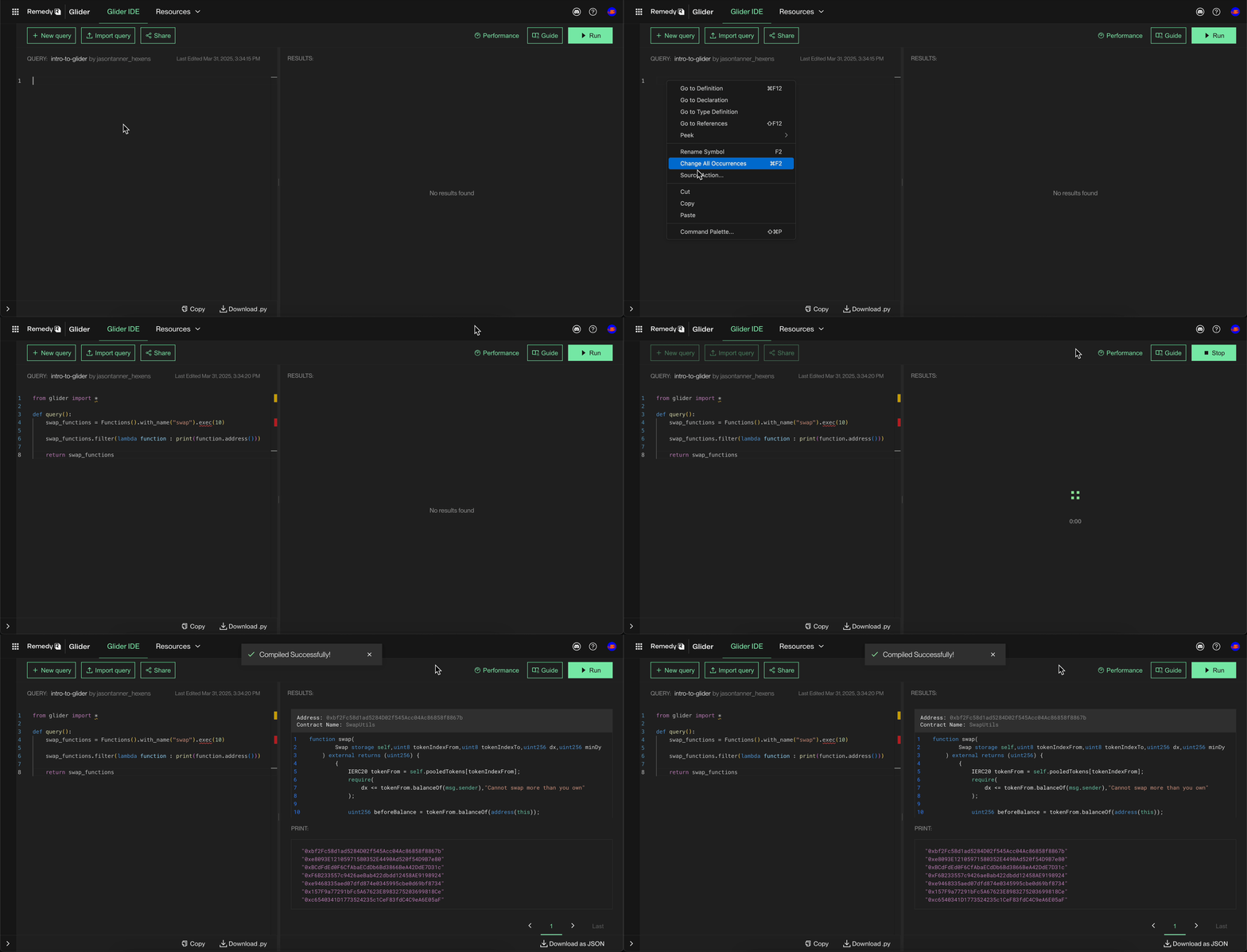
To begin, visit the [Glider IDE page](https://glide.r.xyz/), paste the query below into the IDE, and click the "Run" button.
```python
from glider import *
def query():
swap_functions = Functions().with_name("swap").exec(10)
swap_functions.filter(lambda function : print(function.address()))
return swap_functions
```
Running a Glider Query
Once the query runs, the Glider query results will appear in the Output panel on the right. These results represent Solidity functions named swap. Each result includes the contract’s address and the corresponding code snippet.
Viewing Glider Results
## Breaking Down The Foundational Query
In this topic, we will go line by line through each code snippet in our foundational query above and describe what's happening.
#### **Step 1: Create a Query Function**
Every Glider query requires a query() function to be defined like so:
```python
def query():
# Add query logic here
```
The query() function is executed by Glider’s backend engine and represents the core logic of your query, containing all the necessary information for Glider to search for Solidity code patterns.
Within this function, you’ll define what to search for, apply any filters, and return the results. Every query must return a list, which will then be displayed in the Output panel of the Glider IDE.
#### **Step 2: Creating Functions class instance**
In order to find functions named swap, we must first create a functions class instance like below:
```python
Functions() # Create a Functions class instance
```
The Functions class is provided by the Glider API library.
#### **Step 3: Filtering by Function Name**
```python
Functions().with_name("swap")
```
Next, we call the .with\_name("swap") method. This tells Glider to specifically look for Solidity functions named swap.
#### **Step 4: Executing the Query**
```python
Functions().with_name("swap").exec(10)
```
Finally, we call .exec(10), which executes the query and retrieves the first 10 results that match our criteria.
As mentioned in the [Intro to Python section](https://glide.gitbook.io/main/glider-ide/glider-the-basics/intro-to-python/basic-python#integers), .exec() returns a list of results. In this case, the list will contain the swap functions found by Glider.
#### **Step 5: Storing the Results**
Since .exec(10) returns a list, we can save the list it to a variable for further processing:
```python
swap_functions = Functions().with_name("swap").exec(10)
```
Now, swap\_functions holds a list of the swap functions Glider found, allowing us to reuse and refine this data in future queries.
Now that we found our swap function, let’s continue by exploring how we can iterate through these reulsts and extract additional details!
## Iterating Through The Results
In the next code snippet from the query, we call the filter() function.
```python
swap_functions.filter(lambda function : print(function.address()))
```
As mentioned in the [Advanced Python section](https://glide.gitbook.io/main/glider-ide/glider-the-basics/intro-to-python/advanced-python#filtering-lists), the filter() function is used to filter out items in the list we don't want. That said, there is another nifty trick we can use with filter() that doesn't deal with filtering at all!
Let's say we want to get more info on each item in the swap\_functions variable. One way we can do this is call filter(). Since filter() iterates through the list, we have the ability to access each item in the list. In our case, we can use print() in combination with filter() to get more info on each item.
To accomplish this, we call filter() on the swap\_functions variable and pass in a lambda function. This lambda function includes print() and call to get a [function’s address](https://glide.gitbook.io/main/glider-ide/api/callable/callable.address):
```python
print(function.address())
```
Since we aren’t assigning the filter() results to a variable, it doesn’t matter whether print() returns True or False. Additionally, we don’t care if any items are filtered out, as we’re not using the filtered results—we’re simply calling filter() on swap\_functions.
This is a great way to iterate through a list and debug each item.
## Returning Our Results
In the final line of our query, we return the swap\_functions variable using:
```python
return swap_functions
```
#### **Why is this necessary?**
Every Glider query must include a query() function, and the query() function must return a list. The returned list is what gets displayed in the Output panel of the Glider IDE.
In our case, the swap\_functions variable contains every swap function found. By returning the swap\_functions variable, we ensure that our query results are displayed in the Output panel.
After running the query in the Glider IDE, we should see a list of matching functions printed in the Output panel.
Running a Query and Reviewing the Results
## Conclusion
With this query, we can efficiently identify functions named swap and extract additional details by iterating through the results.
Of course, this is just the beginning! As we progress through this series, we’ll explore more Glider query features, learning how to expand this query to search for different Solidity components and apply more advanced filtering criteria to refine results.
Finally, keep experimenting with the foundational queries we provide. Hands-on experimentation is one of the best ways to gain deeper insights into Glider and master its full potential!